An AI assistant that replies to your Vinted buyers for you sounds magical. In reality, it's a precise mechanism. I'll walk you through, step by step, how it understands messages, how it replies, how it avoids being detected — and why we ended up building it at Bleam.
I've been selling on Vinted for 7 years. A few years ago, I remember an evening I spent with friends where, every 5 minutes, I was unlocking my phone to reply to a Vinted message. A size question, a buyer offering €15 instead of €20, a worn photo request. I'd apologize, reply quickly, then plug back into the conversation with my friends. Except I wasn't really in the evening anymore.
At some point I stopped and thought: "this is ridiculous, I'm spending my evening on my phone while 90% of these messages are the same questions." That's where the idea of the Bleam Intelligent Assistant came from. Not from a strategic reflection — from something very concrete: giving Vinted sellers back their evenings, their weekends, their nights.
Today, the Assistant has analyzed 1.5 million real conversations and runs for more than 10,000 pro sellers. In this guide, I'll explain exactly how it works — how it reads a message, how it decides on a reply, how it avoids being flagged as a bot, and what it categorically refuses to do.
An active Vinted seller easily gets 30 to 100 messages a day. "Still available?", "what size is it?", "when do you ship?", "worn photo?", "I offer €12". Replying to all that takes time — real time. Not 2 minutes, more like 1 to 2 cumulative hours a day if you do it seriously.
And the worst part is that most of these messages need a fast reply. Not within the day, not within the hour — within minutes. Because a Vinted buyer has 50 tabs open, talks to 5 different sellers, and buys from the one who replies first. It's that mechanical.
80% of Vinted sales close in the first 5 minutes after the initial message. If you reply 20 minutes later, statistically, you've already lost the sale — even if your price is better.
Many people picture an AI assistant as "a robot that copy-pastes the same reply every time." It's the opposite. Here are the 6 things a good AI assistant actually does on Vinted.
Size, material, measurements, authenticity, condition, shipping days, availability. The assistant pulls the right info from your listing + your seller preferences, and replies like you would.
When a buyer offers a price, the assistant calculates based on your rules and replies: accept, counter, or refuse. It also handles multi-step negotiation, not just a single counter-offer.
If the buyer asks for a worn photo, the assistant can generate one automatically from your product pictures and send it directly in the conversation.
When a buyer wants several items, the assistant applies a margin bonus that reflects a real commercial gesture — no manual calculation needed.
If a buyer didn't reply to your message, the assistant sends a follow-up 24h later. Statistically the best window to recover a sale that was about to be lost.
If the buyer writes in German, Spanish or Italian, the assistant replies in their language. 10 languages supported at Bleam (French, English, German, Spanish, Italian, Portuguese, Dutch, Polish, Swedish, Danish).
The first step, when a new message arrives, is to understand what the buyer wants. It's called "intent detection". Concretely, the assistant classifies the message into a category. Here are the main ones it detects:
"I offer €15", "can you come down to €20?", "is €18 possible?". The assistant detects an offer and switches into negotiation mode.
"How does it fit?", "what are the exact measurements?", "would it fit a 40?". The assistant returns listing info or asks for clarification.
"Do you have a worn photo?", "what does it look like on?". The assistant can generate and send a photo automatically.
"When do you ship?", "is it via Mondial Relay?", "how many days?". The assistant replies based on your configured shipping rules.
"Is it authentic?", "is the condition good?", "any flaws?". The assistant confirms based on the listing description, never making things up.
"Hi", "still available?", "interested". The assistant replies politely and re-engages the conversation to understand what the buyer wants.
This classification happens in under a second. And once it's done, the assistant knows exactly what type of reply to generate, with which information.
Detecting intent is 30% of the job. Writing a reply that doesn't sound like a robot is the remaining 70%. Here are the parameters the assistant factors in for every message.
The assistant reads your listing in full: brand, size, condition, material, measurements if provided. It'll never say "it's cotton" if you wrote "polyester".
Shipping days ("I ship on Saturdays"), return policy, preferred shipping method, tone (casual/formal), sign-off. All configured once, and the assistant respects these rules on every message.
If the buyer already told you their name, the assistant uses it. If you already negotiated at €18 and the buyer comes back, it remembers. No repetition, no flat replies.
The assistant automatically detects whether the buyer writes in French, English, German, Spanish, Italian, etc., and replies in the same language without you doing anything.
Are you the cool relaxed type? More professional and measured? The assistant adapts the register. At Bleam, you pick a personality (young, mom, pro, adaptive) that shapes the tone of replies.
At Bleam, this "writing" layer is trained on 1.5 million real Vinted conversations. It's not generic ChatGPT, it's a model that has concretely seen what makes a buyer say yes or move on to another seller.
A buyer who senses they're talking to a bot closes the conversation. A serious AI assistant bakes in many small details so it feels human, even after 10 messages.
The assistant doesn't reply in 0.3 seconds. It waits anywhere from a few seconds to a few minutes, like a human checking their phone. Sounds obvious, but many tools skip this detail.
If you have 15 pending messages, the assistant doesn't burst through all of them. It spreads them out in time so it looks like a human handling conversations one by one.
The assistant never replies exactly the same thing twice. Even for the same question, it varies words, phrasing, punctuation. Avoids the "it's always the same copy-paste" pattern.
Vinted sellers don't write like sales execs. They use short forms, casual punctuation, sometimes emojis. The assistant reproduces this natural style, not stiff business writing.
Across the 10,000+ pro sellers using Bleam daily, we've never had a buyer feedback where they guessed they were talking to an AI. That's the real test.
A serious AI assistant has very clear limits. That's actually what separates a tool you can use with peace of mind from something that'll eventually get you in trouble. Here's what the Bleam Assistant categorically refuses to do.
If you didn't specify the material, the assistant won't guess it. If you didn't provide exact measurements, it won't invent them. It simply says it doesn't have the info.
If you configured "I ship on Saturdays", the assistant will never promise shipping tomorrow. If you don't accept returns, it won't say otherwise. Your rules are the source of truth.
The minimum price you configured is untouchable. Even if a buyer pushes 10 times, the assistant won't go below. That's your safeguard.
If it hits a message it doesn't understand or that falls outside its scope (very specific question, unusual request, emerging conflict), the assistant won't risk answering blind. It sends you a notification by email or on Discord so you can take over yourself.
An AI assistant should help the seller, never put them at risk. No promises you can't keep, no inventions, no buyer manipulation. When it doubts, it hands off. These are hard-coded red lines at Bleam — not a marketing choice.
Not all tools labeled "AI assistant" are equal, far from it. Here are the real differences between a serious assistant and a tool that's faking it.
Training base
Trained on real Vinted conversations, with millions of examples
Generic ChatGPT or simple pre-defined templates
Intent detection
Finely detects the type of question to pick the right reply
A single pre-formatted reply regardless of the question
Negotiation
Multiple progressive stages, with messages adapted to each step
Accepts or refuses based on a simple percentage, no conversation
24h follow-up
Automatic configurable follow-up to recover lost sales
Zero follow-through, once the message is sent it's done
Multi-language
Auto-detection + native replies in 10 languages
French/English only, or poor automatic translation
Ethical safeguards
Refuses to invent, alerts you when in doubt, respects your rules
Promises anything to close a sale
Bleam ticks all 6 boxes. But what matters is knowing which questions to ask when picking a tool — and not trusting the marketing blindly. Ask for demos, look at real conversations, test for free before committing.
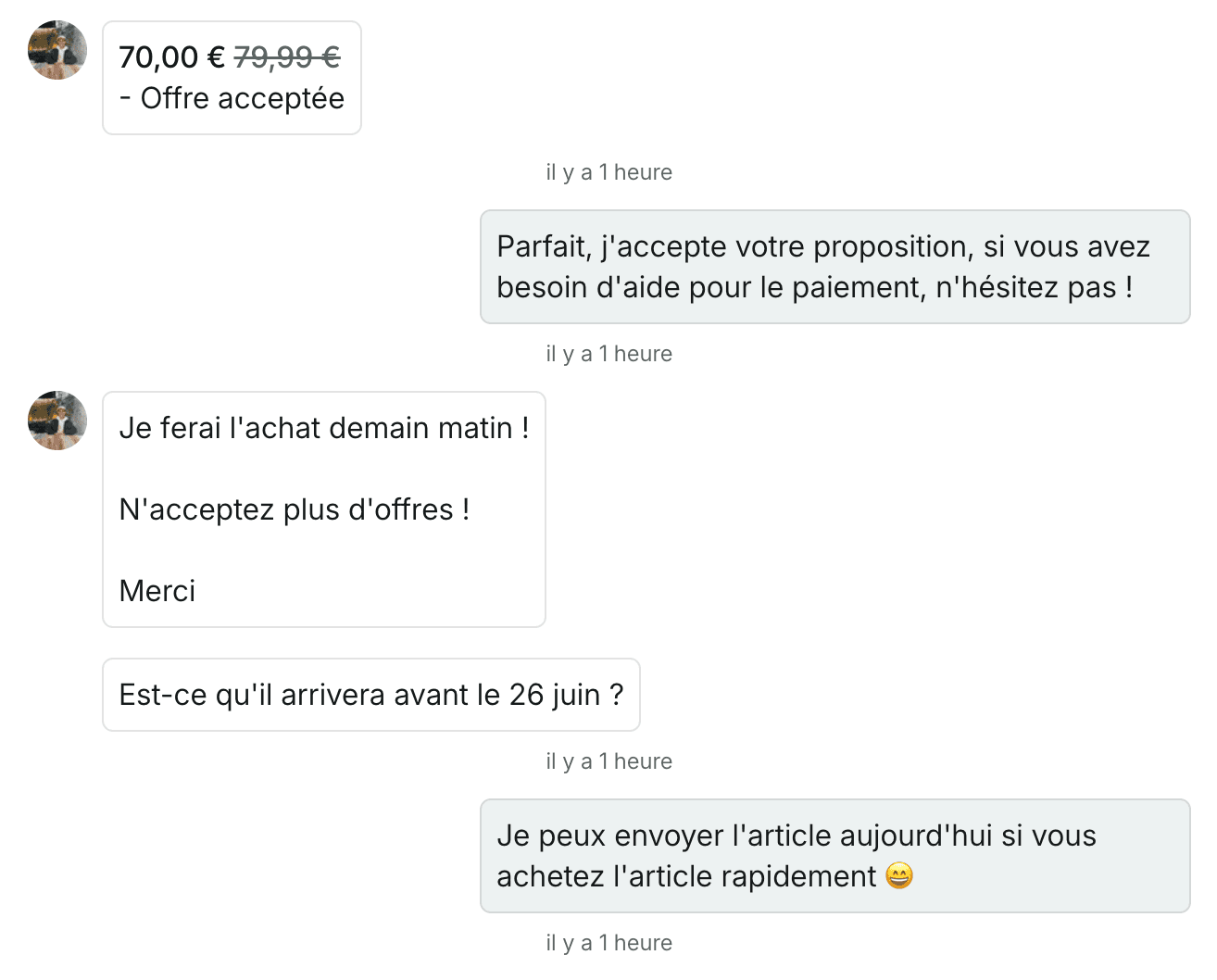
To make this concrete, here are a few screenshots of real Vinted conversations handled by the Bleam Intelligent Assistant. These are real messages, from real buyers, with automatically generated replies.
Real examples of Vinted conversations handled by the Bleam Assistant
The question we don't ask enough: does an AI assistant actually pay for itself? At Bleam, users who activate the Intelligent Assistant generate on average 1,868 euros per month thanks to sales closed by the assistant.
These aren't "extra" sales in absolute terms — they're sales that would've been lost without the AI. Because you were sleeping. Because you were at work. Because the buyer found someone faster elsewhere. The assistant doesn't create demand, it prevents you from losing the demand that's already there.
Setting up an AI assistant isn't a technical project. It's literally 5 minutes. Here are the steps at Bleam.
One click on the Chrome Web Store, the extension installs. Also works on Chromium-based browsers (Brave, Edge, Opera, Arc).
The extension automatically detects that you're logged into Vinted. You click to link the account to Bleam, done.
Shipping days, negotiation margin per price range, tone (casual/formal), personality (young, mom, pro, adaptive). Default values are pre-set if you want to go fast.
A toggle to flip. From that moment, the Assistant reads your Vinted messages and replies automatically based on your rules.
You can disable the Assistant at any time, or configure it item by item if you want to keep some listings for yourself. You always stay in control.
If you're on the fence, just test it. Bleam offers a free commitment-free trial, cancellable in one click. Let the Assistant run for a week, look at your conversations, and you'll see for yourself what it changes on your sales and your time.
Start with BleamNo, not if the assistant is well built. Natural response delays, pauses between messages, phrasing variations, Vinted-style writing — all these details make the buyer feel they're talking to a human. Across 10,000+ pro sellers using Bleam, we've never had a buyer guess.
Yes, 100%. You configure your rules (margins, shipping days, tone, personality), you can disable the assistant item by item, and it notifies you when it doesn't know how to reply so you can take over. Nothing slips past you.
It doesn't reply blind. It sends you a notification by email or on Discord with the message in question, and you decide how to reply. The idea is that it handles what it's sure about and saves you time on the rest, not that it risks saying anything.
No, not if the assistant respects the platform's limits. Serious extensions like Bleam run in your browser, respect human delays, and automate actions you'd do manually. What causes trouble is tools promising to "bypass detection" — there, you're taking a real risk.
At Bleam, 10 languages: French, English, German, Spanish, Italian, Portuguese, Dutch, Polish, Swedish, Danish. The assistant auto-detects the buyer's language and replies in the same. Handy if you sell across multiple European markets.
Yes, it's one of its big strengths. It detects price offers, applies your margin rules per price range, makes progressive counter-offers (not just a binary yes/no), handles bundles with margin bonus, and never goes below your floor price.
The Bleam Intelligent Assistant is available from our higher plans, with a free no-commitment trial. On average, Assistant users generate €1,868/month in extra sales thanks to it — far more than enough to pay for the subscription.
5 to 10 minutes. Install the extension, connect the Vinted account, configure your preferences (margins, shipping days, personality). The assistant starts working the moment you turn it on.
Yes, in one click. You can also disable it item by item if you want to keep certain listings for yourself. And of course, the Bleam subscription is cancellable anytime in one click, no commitment.
Everything you just read, you can test for free. The trial is commitment-free, cancellable in one click. Within the day you'll already see the difference — especially on your evenings and weekends.
Free trial, no commitment, cancel in one click.
Félicien — Founder of Bleam, Vinted reseller for 7 years
We use cookies to improve your experience on our site. You can accept all cookies or customize your preferences.
 Bleam
Bleam