
: guide rebuilt task by task (Vinted by hand or Bleam), with our figures on offers and negotiation, and a section on pacing and precautionary pauses
Automate Your Vinted Sales with Bleam: The 2026 Task-by-Task Guide
To automate your Vinted sales, hand Bleam the tasks Vinted leaves you to do by hand: reposting and scheduling your listings, messaging every member who favorites an item with an offer, answering buyers and negotiating, lowering the price of listings that don't sell, ordering shipping labels and tracking your sales, on one account or several. You set up each automation once, then Bleam takes care of it at a pace close to your own, and every action is logged in the Activity log. On Bleam sellers' accounts, a 10 to 15% offer sent to favorites brings 52% more sales than a message alone. Here is, task by task, what Vinted lets you do by hand and what Bleam does for you.
Indice · 11 sezioni
What Bleam automates on Vinted, task by task
Eight tasks come back every week when you sell on Vinted. Here is how each one is done by hand, and what Bleam does for you.
| Task | On Vinted, by hand | With Bleam |
|---|---|---|
| Reposting a listing | Delete the listing and create it again (photos, text, price), or pay for a Boost to push it up for 3 or 7 days. | Reposts the listings you tick one by one, as new, with photos and text slightly retouched. Included in the subscription, nothing to pay per listing. |
| Scheduling a listing | The listing goes live the moment you publish it; a draft waits until you publish it yourself. | Publishes a draft, reposts a listing or changes a price on the date and at the time you choose, up to 30 days ahead. |
| Messaging favorites with an offer | Follow new favorites in your notifications, then write to each member and make them an offer, one by one. | Sends your message a few minutes after each new favorite, with a one-click offer, a separate message for bundles and rules by time, day or price. |
| Answering buyers and negotiating | Answer every question and every offer yourself, evenings and weekends included. | The AI assistant replies in under 5 minutes, accepts offers that respect your minimum price and counter-offers otherwise, never going below it. |
| Lowering the price of a listing that isn't selling | Change the price yourself, listing by listing, and remember to do it again the following week. | Lifecycle lowers the price step by step down to the floor you set, reposts the listing, and can raise the price of an item that attracts favorites. |
| Shipping labels | Open each order, then download and print its label, one at a time. | Orders the label as soon as a sale is detected and puts all your labels into a single PDF, on A4 or for a thermal printer. |
| Invoices and sales tracking | No invoice for the seller, and a sales history that knows neither your purchase price nor your profit. | Your sales land in Bleam on their own, across every account, with profit worked out from your purchase prices and the URSSAF summary. PDF invoices take a few clicks. |
| Several accounts | One account at a time: you sign in again to switch, and read each inbox separately. | Up to 10 accounts in one subscription, and more with extra accounts: one inbox for every conversation, automations set account by account. |
Reposting a listing
- On Vinted, by hand
- Delete the listing and create it again (photos, text, price), or pay for a Boost to push it up for 3 or 7 days.
- With Bleam
- Reposts the listings you tick one by one, as new, with photos and text slightly retouched. Included in the subscription, nothing to pay per listing.
Scheduling a listing
- On Vinted, by hand
- The listing goes live the moment you publish it; a draft waits until you publish it yourself.
- With Bleam
- Publishes a draft, reposts a listing or changes a price on the date and at the time you choose, up to 30 days ahead.
Messaging favorites with an offer
- On Vinted, by hand
- Follow new favorites in your notifications, then write to each member and make them an offer, one by one.
- With Bleam
- Sends your message a few minutes after each new favorite, with a one-click offer, a separate message for bundles and rules by time, day or price.
Answering buyers and negotiating
- On Vinted, by hand
- Answer every question and every offer yourself, evenings and weekends included.
- With Bleam
- The AI assistant replies in under 5 minutes, accepts offers that respect your minimum price and counter-offers otherwise, never going below it.
Lowering the price of a listing that isn't selling
- On Vinted, by hand
- Change the price yourself, listing by listing, and remember to do it again the following week.
- With Bleam
- Lifecycle lowers the price step by step down to the floor you set, reposts the listing, and can raise the price of an item that attracts favorites.
Shipping labels
- On Vinted, by hand
- Open each order, then download and print its label, one at a time.
- With Bleam
- Orders the label as soon as a sale is detected and puts all your labels into a single PDF, on A4 or for a thermal printer.
Invoices and sales tracking
- On Vinted, by hand
- No invoice for the seller, and a sales history that knows neither your purchase price nor your profit.
- With Bleam
- Your sales land in Bleam on their own, across every account, with profit worked out from your purchase prices and the URSSAF summary. PDF invoices take a few clicks.
Several accounts
- On Vinted, by hand
- One account at a time: you sign in again to switch, and read each inbox separately.
- With Bleam
- Up to 10 accounts in one subscription, and more with extra accounts: one inbox for every conversation, automations set account by account.
And there's more: Bleam also has listing templates, Auto stock to put an item you sell in several copies back online, a 5-star review left for the buyer after the sale, backups of your listings, an iPhone and Android app that alerts you at every sale, and a connector to ask ChatGPT or Claude about your sales. Everything is in one place.
What it changes, in figures
+52%
more sales with a 10 to 15% offer to favorites
3 in 4
Vinted sales happen after an offer
12.8%
below the listed price: where a negotiated sale usually closes
These figures come from Bleam sellers' accounts, as anonymised totals. Across 478,885 messages to favorites sent from September 29 to October 12, 2026, a 10 to 15% offer brings 25.7 sales per 1,000 messages, against 16.9 with no offer or less than 10%.
On negotiation, across 198,697 sales closed from August 21 to October 20, 2026, three out of four happen below the listed price, after an offer. Across 118,698 price proposals, buyers usually ask for 27.8% off, and the sale closes 12.8% below the listed price. A buyer who names a price buys 45 times out of 100, against 30 when they don't mention price: answer fast and counter-offer.
And time? Take a week with 30 sales: 30 labels at 1 min 30 each is 45 minutes; 120 favorites followed up at 30 seconds each, one hour; 40 messages at 2 minutes each, 1 h 20. More than three hours by hand, just for those three tasks.
The full method is in our Vinted negotiation study.
Reposting and scheduling your Vinted listings
Reposting a listing puts it back at the top, like an item that has just gone on sale. With Bleam, you tick your listings on your Vinted profile or in the Dressing on bleam.app, choose the retouches and the time, and Bleam reposts them one by one: photos slightly retouched (frame, crop, micro-variations, rotation or AI retouch), text rewritten by AI if you wish, one euro less if you want. Unlike a Boost, nothing is paid per listing.
The same feature schedules your listings: a draft, a repost or a price change goes out on the date and at the time you choose, up to 30 days ahead. You prepare your listings when you have time, on Vinted or on the Publish page of bleam.app, and they go out when you want. All your schedules, across every account, are in the Activity log.
With the extension, Bleam works as long as the computer is on; with Bleam Cloud, your schedules go out on time, even with the computer off. A task due while the computer sleeps isn't lost: it goes out when it wakes up.
Messaging favorites with an offer
A member who favorites your item is interested, but hesitating. Bleam sends them your message within minutes, with the offer of your choice, in euros or as a percentage, which they accept in one click. Aim for at least 10%: below that, the offer sells no more than a message alone.
You write one message for a single item and another for bundles, then, if you like, different versions by time of day, day of the week or item price. You can also wait before sending, up to 7 days. And Bleam never writes to a buyer you already have a conversation with.
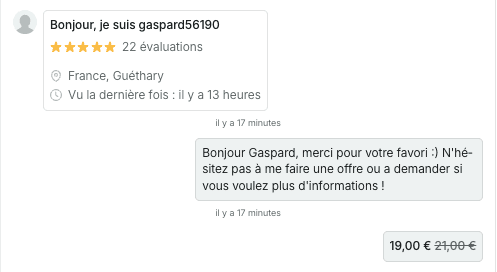
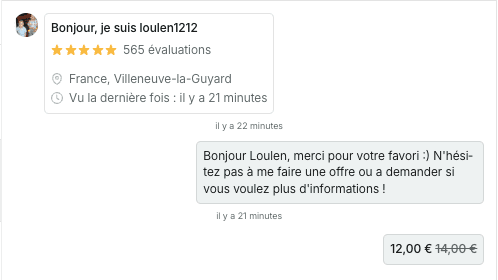
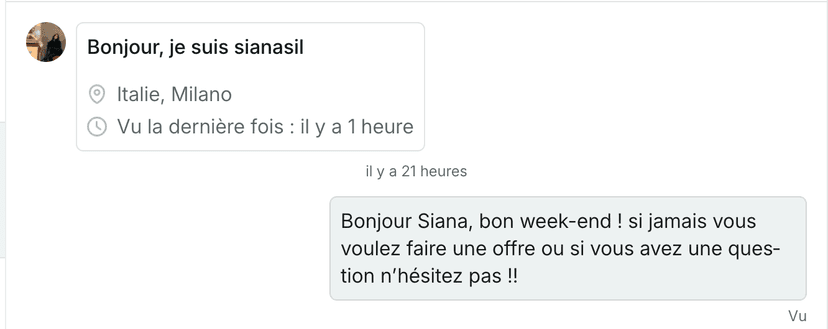
To write yours, start from six Vinted favorite message templates to copy.
Answering buyers and negotiating with the AI assistant
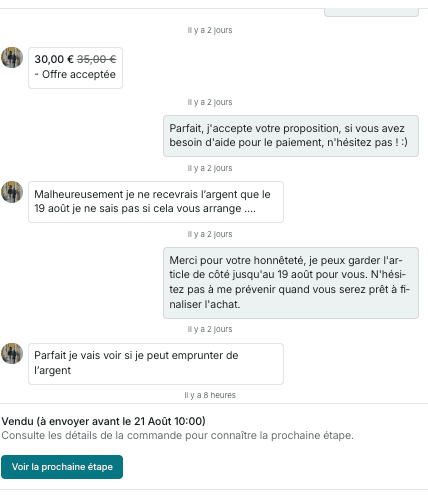
Bleam's AI assistant answers your Vinted buyers in under 5 minutes, with the computer on or 24/7 with Bleam Cloud: shipping days, measurements, condition, authenticity, shipping costs, reservations. It draws on your settings and on the listing, in the tone you choose (young, professional, warm or adaptive), in the language you choose among 10. Its Memory keeps your habits: how long you hold an item, whether you take extra photos.
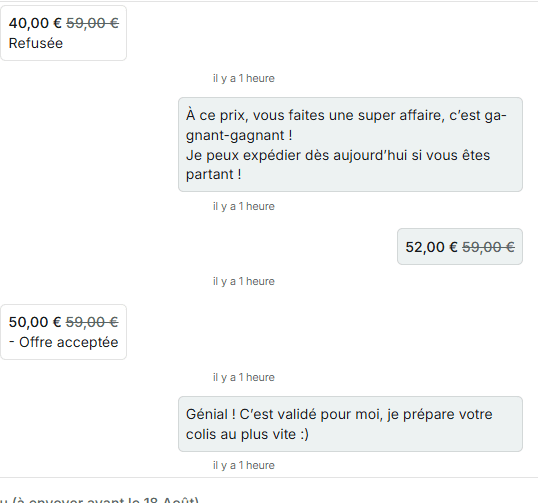
For offers, you set a maximum drop per price tier. Example: a €50 item with a €10 maximum drop. An offer of €42 is accepted. An offer of €30 gets a counter-offer at €45, then €42, then a final one at €40. The assistant never goes below your minimum price, and it ends politely if the buyer refuses.
When it isn't sure of its answer, it stays quiet and can alert you on Discord. And if you open a conversation before it does, it leaves that one to you.
Lowering the price of a listing that isn't selling
Vinted has no button that lowers a price on its own. Bleam's Lifecycle does it, following a Strategy you choose. With the Anti-stagnation template, the price drops by 10% after 7 days without a sale, the listing is reposted 3 days later, and the plan starts again: a €40 item goes to €36 on day 7, is reposted on day 10, goes to €32 on day 14, and so on, never below the floor you set, from 30 to 90% of the starting price.
Each drop edits the listing itself, so Vinted notifies the members who favorited it. An item that attracts lots of favorites can also go the other way: its price rises 10% at a time, up to +30%. You choose how many actions per day and at what times, and every drop is logged in the Activity log with its reason.
Shipping labels, invoices and sales tracking
As soon as a sale is detected, Bleam can order the shipping label for you. On shipping day, you tick your sales and get a single PDF, on A4 or 100 × 150 mm for a thermal printer, with the item's title, your SKU or the buyer's username at the top of each label. The "Pack my parcels" assistant then shows each item next to its label.
Your sales land on the Sales page on their own, across every account, with their status and the amount received; with your purchase prices, Bleam also works out your profit. Invoices take a few clicks: you tick the sales, click "Generate invoices", and the PDF is ready, with continuous numbering. The URSSAF summary works out the revenue to declare in France, period by period.
Managing several Vinted accounts in one place
Bleam links up to 10 Vinted accounts in one subscription, and more with extra accounts. Conversations from all your accounts land in a single inbox, on the computer and in the app, the Dressing shows all your listings, and each automation is set account by account. On a computer, each account has its own browser profile; with Bleam Cloud, each one runs in its own session.
Automating Vinted without taking risks
Bleam does for you what you would do by hand. With the extension, everything starts from your browser and your Vinted session, without changing anything on the site. The rest comes down to pacing, and you set it.
- A pace close to your own. Bleam checks your new favorites every 4 to 6 minutes or so, with an interval that changes each time. Messages go out one after another, spaced out, and Bleam respects the number of new conversations Vinted accepts per hour: during a spike of favorites, it carries on the next hour.
- Spread-out reposts. Listings go back up one by one, with the delay you choose between two. The recommended benchmark is to stay under 30 items published per day per account, reposts included: a big batch is spread over several days.
- Listings that stay unique. Each repost slightly retouches the photos, and the text and price if you want.
- The precautionary pause. If Vinted asks for a check, a captcha for example, Bleam doesn't push: as a precaution, it pauses the automation for a few hours. The Activity log keeps a record of every action.
- You stay in control. Days and hours of action, number of actions per day, delay before messaging favorites, minimum price in negotiation: every setting is yours, account by account.
Where to start
- Create your Bleam space and choose your plan: the 14-day free trial starts right away, with no commitment. Then install the extension on Chrome and link your Vinted account.
- Turn on messages to favorites with a 10 to 15% offer: it's the quickest setting to put in place.
- Tick the listings that are sleeping and schedule their repost for the evening or the weekend.
- Set up the AI assistant: your shipping days, your usual answers and the maximum drop per price tier.
- Put the listings that stall under a Lifecycle Strategy.
- Add Bleam Cloud if you want reposts, messages to favorites and the assistant to run even with the computer off.
Cosa dicono i nostri utenti
«Mi fa risparmiare facilmente 8/9 ore a settimana»
«App super intuitiva, copre tutte le esigenze di un rivenditore Vinted. Il team di sviluppo ci ascolta davvero e migliora costantemente il prodotto in base alle nostre esigenze. È davvero un piacere usarla, ormai non potrei più farne a meno!»
«Permette di moltiplicare il fatturato mensile.»
Automate your Vinted sales with Bleam
All these automations in one place, with a 14-day free trial and no commitment.
Cancel anytime from the Subscription page.
Domande frequenti
Can you automate your sales on Vinted?
Yes. Bleam automates the repetitive tasks of selling on Vinted: reposting and scheduled publishing, messages to favorites with an offer, answers to buyers and negotiation by the AI assistant, price drops on listings that don't sell, ordering shipping labels and tracking sales. Invoices take a few clicks. You set up each automation once, and Bleam takes care of it from then on.
Do I need to keep my computer on to automate Vinted?
With the extension, Bleam runs as long as your computer is on, with Chrome and a Vinted tab open. With Bleam Cloud, your accounts run 24/7, even with the computer off. A task due while the computer sleeps isn't lost: it goes out when it wakes up.
Could I get banned for automating Vinted?
The risk is low. Bleam does for you what you'd do by hand (sending messages, relisting items), spacing out its actions to stay within Vinted's limits, and it doesn't change how the site works. No tool can promise zero risk, but over 10,000 sellers use Bleam every day. Pacing is set account by account, and as a precaution Bleam pauses the automation for a few hours if Vinted asks for a check.
What offer should I send to favorites on Vinted?
At least 10%. Across 478,885 messages to favorites sent by Bleam sellers from September 29 to October 12, 2026, a 10 to 15% offer brings 25.7 sales per 1,000 messages, against 16.9 with no offer or less than 10%: 52% more sales.
Does Bleam work with several Vinted accounts?
Yes. Bleam links up to 10 Vinted accounts in one subscription, and more with extra accounts, with a single inbox for every conversation and automations set account by account.