
Automatic reposting
Repost your Vinted listings automatically with Bleam
14-day free trial, no commitment.
Oltre 10.000 venditori usano Bleam
To repost your Vinted listings automatically, install the Bleam extension, tick your listings and pick a time: Bleam puts them back online like new, one by one, with lightly retouched photos and text so Vinted doesn't see a duplicate. With Bleam Cloud, reposts go out even with your computer off, and Lifecycle reposts items that don't sell on its own. Bleam starts at €15/month, with a 14-day free trial.
See how it worksUpdated on 27 ottobre 2026
In 5 steps
How does it work?
Install Bleam and open Vinted
Add the Bleam extension to Chrome (or Brave, Edge and other Chromium browsers), then open Vinted: the Bleam bubble shows up on the page. You can link several Vinted accounts to the same Bleam space.
Pick your listings
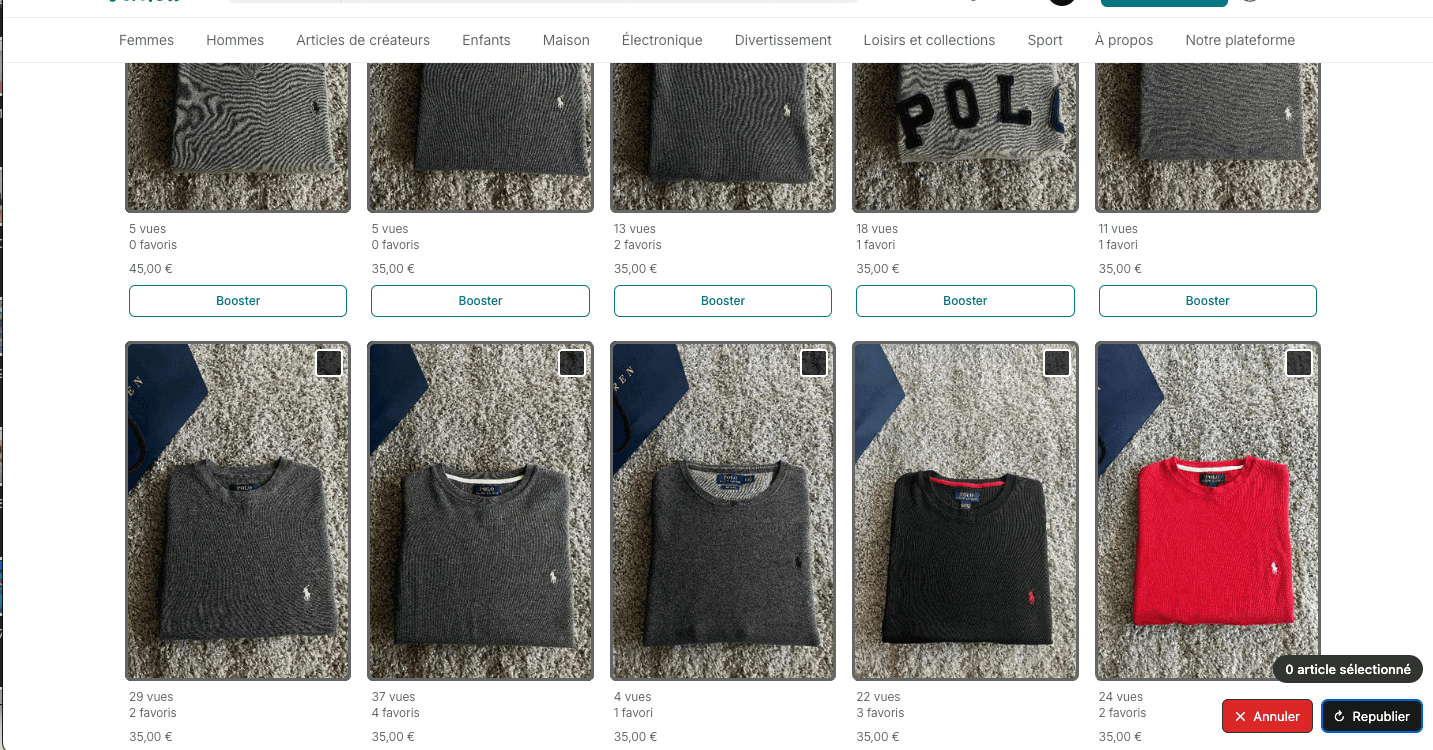
On your Vinted profile, click Repost and tick the listings, one by one or all at once. You can also pick them in the Dressing of your Bleam space, on desktop or in the app.
Set the retouches
Frame, crop, micro-variations, rotation or AI retouching of the photos, title and description rewritten by AI, price lowered by €1: each listing goes back out unique in Vinted's eyes. Turn on at least one photo retouch.
Launch now or schedule
Repost right away, or pick a date and time up to 30 days ahead, Saturday evening for instance. Bleam reposts items one by one, spaced by the delay you set. Above thirty or so listings within 24 hours, Bleam offers to spread the rest out, one batch every 24 hours.
Follow everything in the activity log
Each repost has its line in the activity log of your Bleam space, with upcoming schedules you can move or cancel. An email can send you the result when it's done.
Example
An example with 45 listings
You have 45 listings between €15 and €40 that aren't moving. On Thursday evening, you tick them in the Dressing and schedule their repost for Saturday at 6 pm, with a frame on the photos and €1 off the price.
On Saturday at 6 pm, Bleam reposts the first 30 one by one: a €25 sweater goes back out at €24. You accepted to spread the rest: the other 15 go out on Sunday at 6 pm.
Each listing comes back to the top of your closet, like a freshly listed item, and the activity log shows every line. You had nothing to do on Saturday evening.
Our numbers
What our sellers' sales show
- 75% of single-item sales close below the listed price, with a median discount of 18.1%. Taking €1 off at repost refreshes the listing without eating into your margin; the real price drop, when one is needed, is handled separately by Lifecycle.
- Under €10, almost one sale in two closes at full price (31,268 sales); above €60, 84% of sales go through an offer (19,150 sales). Reposting is first about moving back to the top of your closet; price is mostly negotiated on pricier items.
Bleam study on aggregated, anonymised data from its sellers: 198,697 single-item sales from August 21 to October 20, 2026, across 4,575 Vinted accounts.
Read the study on Vinted negotiationThe video
Reposting in 7 minutes (in French)
In the video
- The closet of all your accounts, synced in Bleam and handled in bulk.
- The retouches at each repost: AI-retouched photos, frame, rotation or crop, price and text lightly changed, with a before-and-after preview.
- Saved photos: every repost starts again from the original photo, never from the previous one.
- Draft mode, which waits for your approval on Vinted, and scheduling at the date and time you pick.
- Bleam Cloud, so everything runs on our servers with your computer off.
Video transcript
What is said in the video (in French), translated into English and lightly edited for reading.
0:00Now your extension is active on your Vinted account: from now on, your Vinted account is synced with Bleam. What gets synced is your closet. When I open the Dressing in Bleam, it's synced with my Vinted closet. This is a test account, I only put one listing on it, and you can see these shorts are also in my Vinted closet. If you have 200 listings, all 200 will be there.
0:29All the listings from all your Vinted accounts are centralized in one place, and you can run actions from there. The one we'll look at is reposting. It's very simple: click the "Select" button and choose your listings. You can then run several actions, but the one we care about is reposting. Click it, and Bleam offers settings to edit the listing while it's reposted.
0:55Because, as you know, when you repost a listing on Vinted, Vinted doesn't really like it: if it's exactly the same listing, Vinted can restrict you for duplicates. And that's not what we want. So we make changes to both the images and the text: the reposted listing is new in Vinted's eyes.
1:14One of the best ways to do that is to turn on the AI photo edit. Bleam changes each photo very slightly with AI: it's almost invisible to the naked eye, but for an algorithm, those are big changes. It's really handy: you see almost the same image, but the image has changed, and Vinted doesn't see a duplicate.
1:38You can also change the price. A listing you repost is often one you maybe listed a bit too high: Bleam can lower the price automatically. And while you're at it, you might as well turn on the AI text edit: after the photos, we change the title and the description. Don't worry, these aren't big changes. On "Light", Bleam just rephrases the text a little: your title and description are slightly different, the original meaning is kept, and these small changes, once again, keep the listing from being seen as a duplicate.
2:15With that, you already have all the basics to repost without any problem. I'll still explain the other options. There's the AI photo edit, but you can also edit the photos by hand. For example, you can put a gray frame around the photos: you see the photo before and the photo after, with the gray frame, and the repost goes out with those changes. Again, the idea is to have a listing that's different from the first one. You can set the frame size, and rotate the image if you want.
2:58I really recommend either putting a frame around the photos or cropping, which zooms in a little so the photo is slightly different. Here you can barely see it, but if I set 8%, the zoom is much stronger. Those edits are more for your third, fourth or fifth repost. At first, I'd just recommend the AI photo edit, because it's really handy.
3:20Next, you can leave the listing as a draft. If you turn this option on, the listing is reposted, but not published right away on Vinted: it first lands as a draft in your closet, and it's up to you to complete it and confirm you want to publish it.
3:42One of the most important options is "Use backed-up photos", which is already on by default. Here's what it does: during the repost, Bleam saves the original photos. As I said earlier, the photo on the left is the original, and the one on the right is the photo after processing. Without this option, if I put a gray frame today and repost again next week with a red frame, I'd get a photo with a red frame on top of a photo that already has a gray frame. The more you repost, the more the changes pile up: after three or four reposts, your listing looks like nothing anymore, and it doesn't sell at all.
4:29That's why we let you save the photos. They're saved on the server, and the next time you repost, Bleam starts again from the original photos. You can repost as many times as you want: each time, Bleam takes the original photo and applies the changes you want. Your changes are different every time, but they start from the original photo, so your photo isn't distorted.
4:53Then you can either repost now, and the repost runs on your Vinted account through your extension, or schedule it. For example, I schedule it for tomorrow at 5 pm, and that creates the task. Tomorrow at 5 pm, the repost will happen. Technically, at 5 pm tomorrow Bleam sends a request to the extension saying this listing needs to be reposted, and the whole repost runs: you end up with a new listing. That means the extension has to be active. If it isn't at 5 pm tomorrow, no problem: the repost will start as soon as your computer is on.
5:38What matters is that the extension is running: everything goes through it, so it has to be open. It's the same for messages to favorites and for the AI assistant: as long as your browser is on, Bleam takes action. We go through the extension because it's the safest method: the extension really uses your browser's data, your IP, which gives human behavior, exactly the same as yours.
6:21There's an option you can add. As I said, the automations run in your browser, but we've released Bleam Cloud: an option that runs your extension on our servers. You can then turn off your computer, everything happens automatically, and you set up whatever you want on the website or the mobile app: all the tasks run without needing the extension open on your side, since it's already open on our server. I'll come back to it later, but yes, we do have a solution so you don't have to leave your computer on. I'm drifting a bit from reposting: see you for the next feature.
What Bleam does on top
By hand or with Bleam?
| What needs doing | By hand | With Bleam |
|---|---|---|
| Put a listing back on top | Delete the listing, recreate it, upload the photos again, copy the text | One click for the whole selection |
| Avoid duplicates | Retouch each photo yourself | Frame, crop, micro-variations, rotation, AI retouching of photos and text |
| Post at the right time | Be at your screen on Saturday evening | Scheduling up to 30 days ahead |
| Large stock | Count what you posted during the day yourself | Bleam counts your reposts over the last 24 hours and offers to spread the rest |
| Item sold, more pieces in stock | List it again by hand | Auto stock reposts it on its own |
| Item that doesn't sell | Lower the price and repost every week | Lifecycle lowers the price down to your floor and reposts |
| Computer off | Nothing goes out | With Bleam Cloud, everything goes out on time, 24/7 |
| Several Vinted accounts | Keep logging in and out | Up to 10 accounts in the same Bleam space |
Put a listing back on top
- By hand
- Delete the listing, recreate it, upload the photos again, copy the text
- With Bleam
- One click for the whole selection
Avoid duplicates
- By hand
- Retouch each photo yourself
- With Bleam
- Frame, crop, micro-variations, rotation, AI retouching of photos and text
Post at the right time
- By hand
- Be at your screen on Saturday evening
- With Bleam
- Scheduling up to 30 days ahead
Large stock
- By hand
- Count what you posted during the day yourself
- With Bleam
- Bleam counts your reposts over the last 24 hours and offers to spread the rest
Item sold, more pieces in stock
- By hand
- List it again by hand
- With Bleam
- Auto stock reposts it on its own
Item that doesn't sell
- By hand
- Lower the price and repost every week
- With Bleam
- Lifecycle lowers the price down to your floor and reposts
Computer off
- By hand
- Nothing goes out
- With Bleam
- With Bleam Cloud, everything goes out on time, 24/7
Several Vinted accounts
- By hand
- Keep logging in and out
- With Bleam
- Up to 10 accounts in the same Bleam space
And reposting is only one part of Bleam: favourite messages, an AI assistant that replies to and negotiates with your buyers, one-click shipping labels, sales tracking and invoices, all in one place.
FAQ
Your questions about reposting
How do I repost a Vinted listing automatically?
With Bleam: tick the listing on your Vinted closet or in Bleam's Dressing, pick your retouches and a time. Bleam puts it back online like new at the scheduled time, without you having to be there.
How many listings should I repost per day on Vinted?
The benchmark we see: under 30 items published per day per Vinted account, a repost counting as a publication. With a large stock, Bleam offers to spread the rest over the following days.
Do reposts go out with my computer off?
Yes, with Bleam Cloud, the €20-a-month add-on: your reposts go out on time, 24/7. Without Cloud, they go out from your browser open with the extension; if the computer is off at the scheduled time, the task waits and goes out as soon as you turn it back on.
Why retouch the photos at each repost?
For Vinted, a reposted listing is a new listing. Light photo retouches (frame, crop, micro-variations, rotation) and, if you like, text or price changes keep it from looking like a duplicate of the old one. The old listing is deleted, and the new one goes back to the top of your closet.
How much does automatic reposting cost?
Reposting is part of Bleam from €15 a month, with a 14-day free trial and no commitment. It is included in the subscription.
Go further
Guides and articles
In the help center
Your Vinted listings move back up, without a thought
Bleam from €15/month, 14-day free trial, no commitment.