
Aggiornamenti
Novità dell'estensione Vinted
Segui gli ultimi aggiornamenti e miglioramenti di Bleam per Vinted.
Ottobre 2026
Lifecycle now revives your stale items on its own
Listings gone quiet? Lifecycle drops or bumps their price and relists them at the right time, so you don't have to. It's now available to all Business plan members.
Bleam up to date with Vinted's new form, custom favourite rules and redesigned notifications
Vinted has changed its listing form and Bleam is already up to date. Also: custom favourite rules, redesigned notifications and shipping labels that are easier to keep track of.
Vinted has changed its listing form.
Bleam is already up to date. Make sure your extension is updated. Update the extension
Messages to favourites: custom rules.
Your conditional messages can now be combined: time, day and price in a single rule, for example "in the evening, for items at €80 and above". And up to 5 price ranges, each with its own message. In Favourites, "Conditional messages" section, "Add a rule" button. Open Favourites
App: redesigned notifications.
"Sold €44.90" with the photo of the item, a different sound for each type of notification, and in the evening, a notification when you have your best day of the month. You can now assign the sounds you want to your notifications.
- Messages: "Hide completed sales" in Filters and sorting, to keep only the conversations that need your attention.
A new, even smoother interface
A new Bleam interface is live, on the website and in the mobile app: even smoother, with even faster loading times.
Your feedback is welcome, on Discord or at support@bleam.app.
New sales dashboard and automatic spreading of listings
A sales dashboard, an even more precise AI assistant, and your listings spread out automatically when needed.
New sales dashboard (Enterprise plan).
At the top of the Sales page: what you have cashed in, the curve compared with the previous period, your monthly goal and your records. Open the Sales page
Automatic spreading.
Bleam handles the pace of your listings and reposts and spreads them over several days when needed, for even greater reliability.
AI assistant Knowledge.
The assistant answers questions it has already been asked with even more precision.
- Even more reliable listing, and an even more precise Accounts page.
Everything runs faster, and the AI assistant says hello
What you start "now" goes right away, a new setting to space out your listings, and an even more reliable CRM.
Pause between two listings.
New setting per Vinted account: space out your listings and reposts during the day, from 30 seconds to 30 minutes between each listing.
The AI assistant says hello.
New option: the assistant opens with "Hello!" in the first message of a conversation, never in the following ones. Turn it on in Replies. Open reply settings
"Now" means now.
A message sent from the central inbox, a listing or a repost started "now" goes out right away. Listing creation and reposting are even smoother.
- Vinted changed a few small things, Bleam has adapted.
Automatic after-sales for everyone and a new model for the AI assistant
Three after-sales automations open to everyone, even more accurate replies, and Auto stock listing by listing.
After-sales: three automations open to everyone.
Pickup point reminder: a message to the buyer when their parcel is waiting at the pickup point. Review nudge: a short reminder 24 h after the transaction is completed. 5-star review for your customer: Bleam leaves it for you when the transaction is completed (never in case of a dispute). Turn them on in Automations, After-sales. Open automations
Auto stock, listing by listing.
New "Auto stock" tab in the Wardrobe: choose how many copies of each listing you have, or put several listings on auto stock at once. Open the Wardrobe
A new model for the AI assistant.
Even more accurate replies for your buyers.
- Vinted changed its categories, Bleam has adapted.
Settembre 2026
A role for each Vinted account and an even more complete Journal
Each Vinted account has its role, the Journal also follows batches started from Vinted, and the purchase price can be entered when creating the listing.
A role for each account.
On the Accounts page, choose whether an account is for selling, buying or personal use. A personal account keeps all its automations, but its sales and purchases don't count in the CRM or the URSSAF summary. Open the Accounts page
Purchase price at listing creation.
Enter the purchase price right in the listing creation form.
An even more complete Journal.
Batches started from Vinted show up too, with their place in the queue and the number of items processed.
- Even steadier listing and reposting, and even more reliable offers to favourites.
The Journal, an MCP connector that takes action, and template folders
A Journal to follow all your operations, an AI that takes action in Bleam, better organised templates and an even more precise CRM.
The Journal: all your operations in one place.
One page for all your Vinted accounts, showing what is coming up and what is done (scheduled listings, reposts…). A failed listing restarts in one click or opens straight in Publish, and you can move a scheduled task without recreating it. Open the Journal
Your AI takes action in Bleam.
The MCP connector grows to 71 tools: Claude, ChatGPT, Grok or Gemini can repost your listings, lower their prices, reply to a buyer, manage your backups and read your sales. Write access is only on if you allow it in your settings. Connect your AI
AI photo touch-ups on repost, for everyone.
The "AI photo edit" option in the repost window is open to everyone.
- New image storage, for even faster listing.
Agosto 2026
The Bleam app is out on iPhone and Android
Everything you do on Bleam, you can now do from your phone.
- Your Vinted messages in one place: every conversation, from all your accounts, in a single inbox. Reply from the app, without opening Vinted.
- List and repost your items from the app, and schedule your reposts.
- A notification as soon as a sale comes in, in real time.
- A notification when the AI assistant needs you.
The app drives, the extension runs: your Bleam extension works on your computer, or 24/7 with Bleam Cloud, even with your computer off.
E-invoicing: get registered in 3 minutes from Bleam
France's e-invoicing reform starts on 1 September 2026. It concerns those who sell with a business status (micro-enterprise or company, with a SIREN): they must be registered with an approved platform. If you sell as a private individual, you are not concerned.
Bleam takes care of it: from your Overview, click "Register me", confirm your identity, and you are listed in the official e-invoicing directory. Three minutes, no account to create elsewhere, registration included in the Enterprise plan.
In September 2027 comes the second stage: reporting your sales to the tax authority. Your Vinted sales are already in Bleam.
Affiliate programme open to all, an even sharper AI assistant and complete invoices
The affiliate programme opens to everyone, the AI assistant answers even better and your invoices carry every legal mention.
The affiliate programme is open to everyone.
Create your own code in one minute, from Bleam. You earn a commission on your referrals' payments, paid out by bank transfer or as credit on your own subscription. Create my code
Automatic exit for the AI assistant.
As soon as you write in a conversation yourself from Bleam's messaging, the assistant steps out of that conversation and keeps going on all the others. Turn it on in the assistant settings, Automatic replies, "Step out when I reply myself".
Complete invoices and credit notes.
Invoices generated from your sales carry every legal mention: SIRET, legal form, RCS, VAT mention and customer address. You can also issue a credit note to correct a sale.
- Vinted changed a few small things, Bleam has adapted.
💬 All your Vinted conversations in Bleam
Now, you can manage all your Vinted conversations, from all your accounts, from one place in Bleam.
Let me introduce you to the Centralized Messaging page. It centralizes your conversations from all your Vinted accounts in real-time.
You can view your messages, reply, send offers… basically, just like in Vinted.
The two major advantages:
- All conversations from all your accounts are gathered in one place. No more juggling between multiple accounts or phones.
- You can access your entire messaging from any device connected to Bleam.
Just make sure your extension is active on one device, or that you are using Bleam Cloud.
This is one of the last pieces of the vision we imagined two years ago at the launch of Bleam. And in a few days, we will reveal the final piece that will complete this vision.
📍 Messaging Tab: https://bleam.app/fr/dashboard/messagerie
Take care of yourself
@English
Improved Reliability of Relisting and SKU System Enhancements
This version boosts reliability: relisting of video games and books, scheduling, price modification — and your shipping labels now display all your SKUs.
✦ New Features
SKU: generate bundle references with one click. On a detailed purchase item by item, "Generate All" creates a complete series (#A12-1, #A12-2, …) for all items at once, and "Copy Tags" gives you a list ready to paste into your listings — with the storage location included in the tag.
Shipping Labels: your SKU references are no longer cut off.
On a bundle of multiple items, the SKU list was exceeding the shipping label and getting cropped when printed. It now automatically spans multiple lines — the "two-line title" option is removed, and it's handled automatically regardless of format.
Video games and books now relist smoothly.
Age classification (PEGI) and book info (ISBN) were getting lost during relisting: the listing would error out or return incomplete. This is fixed, and these categories now relist like all others.
Scheduled price modifications were incorrectly rejected.
A scheduled price change task could fail with a "not in your plan" message even when everything was in order. Fixed.
👕 Manage your Vinted listings from Bleam
Now, you can relist, edit, and delete your Vinted listings from Bleam without ever opening Vinted.
Let me introduce you to the Wardrobe page. It displays your Vinted wardrobe live in Bleam, with all your linked accounts.
You see your items in real-time, and you can take action on them without leaving the dashboard: relist them, change their price, or delete them.
So, you no longer need to be in front of Vinted, or even at a computer. You can initiate a relisting from your phone.
You just need your extension to be active somewhere, or Bleam Cloud, and then you can launch any action even with your computer turned off.
This is a significant advancement on our part. And in a few days, we will release the final piece, which centralizes everything in Bleam. You won’t have to juggle between your different Vinted accounts anymore.
📍 Wardrobe tab: https://bleam.app/fr/dashboard/dressing
@everyone
Luglio 2026
🧠 New: AI Assistant Memory
"Do you still have the original receipt? " "Where did you buy it? " "Do you have other similar models to this item? "
Until now, your assistant responded with listing information and your general rules. But some answers depend on the item, brand, or category... and this information isn't written anywhere.
The Memory 🧠 changes that.
You can now teach your assistant tailored responses for specific situations.
For example, you can teach it that:
- for the
Shoescategory, you don't take worn photos; - for items in the
Sweatercategory and from theNikebrand, you have multiple models in stock; - for items over
100 €, you accept reservations for up to 48 hours;
The assistant automatically detects the context of the conversation and uses the correct response when relevant.
Two ways to teach it:
- ✍️ You create a memory. Choose a context (brand, category, price range, item...) and simply write the response as you would to a buyer.
- 🤖 The assistant asks you the question. When it doesn't know the answer, the question appears on your dashboard. You teach it the answer once, and it will automatically use it in future similar conversations.
In the end, your assistant no longer just responds with listing information or your general rules. It gradually learns your account's habits and responds more like you.
📍 Memory tab of each Vinted account, Business plan 📖 Complete guide: https://bleam.app/fr/help/memoire-assistant
International Shipping Labels & Major CRM Update
What's new: improved shipping labels and a CRM that takes a leap forward — monthly tracking, manual sales, and true bundle management.
✦ New Features
Shipping Labels: A5 format supported for all Vinted countries. Until now, we only managed French shipping labels well. That's a thing of the past: shipping labels for all Vinted countries are now supported, the A5 format is available on each of them, and the print quality is sharper.
CRM: A monthly filter for your sales. Display sales from a specific month with one click — handy for your accounting or for comparing your months against each other.
Create manual sales from the Sales page. Made a sale outside of Vinted? Add it directly from the Sales page to keep all your accounting in one place.
You can see if your bundle is profitable at a glance.
You can see if your bundle is profitable at a glance. On the details page of a bundle purchase: how many items sold, how much it earned, and what percentage of your bundle is reimbursed. "€32 recovered from €40 — reimbursed at 80%": you know exactly where you stand.
The CRM can finally manage your bundles. Here’s the idea in 30 seconds. You buy a bundle of 8 t-shirts for €40, and sell them one by one. The question is: how much do I earn on each sale? Now, Bleam answers that automatically. You assign a SKU to your purchase (that’s your item reference, for example #A12), you write that same SKU at the end of each of your listings, and with each sale, Bleam finds the purchase, counts €5 of cost (€40 ÷ 8), and calculates your profit. Zero data entry. In detail:
Did you buy a bundle in a single listing? Tell Bleam. Before, a "bundle of 8 t-shirts" bought in one listing counted as 1 single item: impossible to link more than one resale. Now, open the purchase, click "Is it a bundle?", indicate 8 — and link each of your 8 resales, the cost distributes automatically.
Each item in your bundle has its own line. In the details of a purchase of 30 items, you now see 30 lines. The Ralph Lauren t-shirt in the bundle is worth more than the others? Assign it its true cost, and the rest distributes over the other items. You can also give each item its SKU and storage location (bin, shelf). For your already created bundles, a "Detail Items" button does everything in one click.
Your SKU appears everywhere, even without a recorded purchase. As soon as you write a SKU like #A12 in a listing, it appears on your Sales page, your invoices, and your CSV export — even if you haven't created the corresponding purchase yet. Handy for finding your items.
The SKU can be placed wherever you want: end of the title or end of the description.
Bleam automatically recognizes it in both cases, no settings needed.
Your history fills itself in.
Starting with SKUs today? Assign a SKU to an old purchase: all your past sales that already had this SKU link up at once.
More complete invoices.
The SKU appears on your invoices, and a sold bundle is detailed line by line, item by item.
- The last small issues with relisting have been resolved.
The MCP Connector is here: connect Bleam to your AI
MCP Connector — Are you already using Claude or ChatGPT? Give them access to your Bleam data and discuss your Vinted activity in your own words. You ask, the AI answers, based on your real sales, purchases, and automations. Here are some examples:
- "How much did I really earn this month, after all fees?"
- "Compare my sales from June and July"
- "Which brand should I prioritize repurchasing for my margin?"
- "What is selling the fastest for me right now?"
- "How much has the AI assistant saved me this month?"
- "Are my accounts and automations running smoothly?"
- Compatible with Claude (web and app), ChatGPT, and OpenCode. 100% read-only: the connector does not modify anything on your account and your data does not go to anyone else. Nothing to install — Discover the MCP Connector →
Bleam V2 — CRM Update
- Purchases Page — your Vinted purchases sync automatically (item, price, photos), and a thrift purchase can be added manually in two seconds
- Sales Page — each sale is linked to its original purchase: revenue, actual profit, and ROI calculated automatically, down to the cent
- Publishing from Bleam — same photos, same form as Vinted, you just choose the account that publishes. Immediate or scheduled
- SKU System — assign a reference to a purchase, slip it into your listing, and the sale links automatically
- Packing Assistant — after your shipping labels, each order displays one by one with the item's photo, size, and storage
- Legal Invoices — generated with one click, featuring your logo and mandatory mentions
- Customizable Overview — monthly goals, records, top brands, AI gains: you choose the blocks and move them around
- Unlimited Purchase Accounts — an account solely for buying links for free, without using a slot from your subscription
- Task Scheduling — now unlimited on all plans
- Help Center — completely revamped, with animated demos and a guided tour of the new features
- The CRM is included in the Enterprise plan. On other plans, your sales already sync: take a look, we've left you a preview
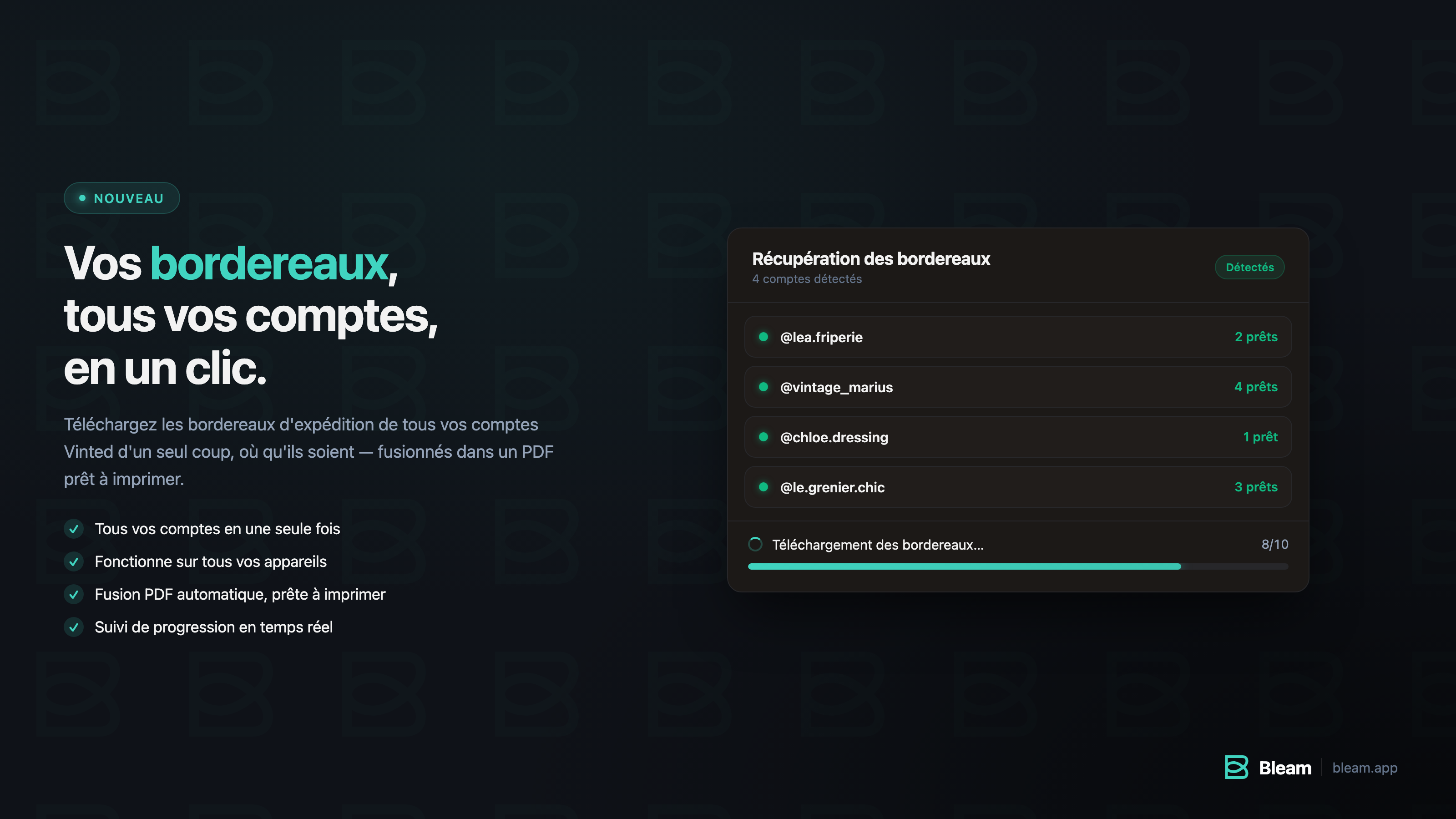
Grouped shipping labels from the dashboard
- Download the shipping labels for all your Vinted accounts at once, directly from the dashboard, compiled into a ready-to-print PDF — accessible from anywhere, even your phone, and available on all plans.
Giugno 2026
Template Improvements
- Added a search bar directly on the item creation page to streamline template selection.
- You can now delete all your templates in bulk.
- Vinted Go shipping labels for Germany are now properly cropped.
- Templates apply smoothly.
Update - Early June 2026
- (Dashboard) Add new negotiation tiers: set your own margins.
- (Dashboard) You are directly informed on the dashboard if a Bleam service is down.
- (Bleam Cloud) Added the ability to relaunch a session if it is defective.
- (Support) Redesigned the Bleam help page and added a more relevant AI assistant (Leo).
- (Extension) Negotiation offers rounded properly on low-priced items.
- (Dashboard) Improved dashboard interface to manage your various Vinted settings.
- (Bleam Cloud) Improved server stability.
- (Bleam Cloud) Launching a session is now faster.
- (Extension) More stable connection to Bleam with fewer disconnections.
- (Extension) Better calculated bundle offers: the price adapts to the entire bundle, not just the first item.
- (Extension) Fixed retrieval of shipping labels based on the last word of the description.
- (Dashboard) The "apply to all accounts" button now works for features (Nexus).
- (Dashboard) Messages to favorites and relistings are now more stable.
- (Dashboard) You can now choose the {price} on all types of negotiation messages.
- (Dashboard) If you have more than 1000 backups, you can now see them all.
- (Nexus) You can now choose whether to relist your favorites or not.
Maggio 2026
Stabilization
- Support for the variable {size} in templates following the recent Vinted update
- New documentation integrated into Bleam
- Improved AI assistant
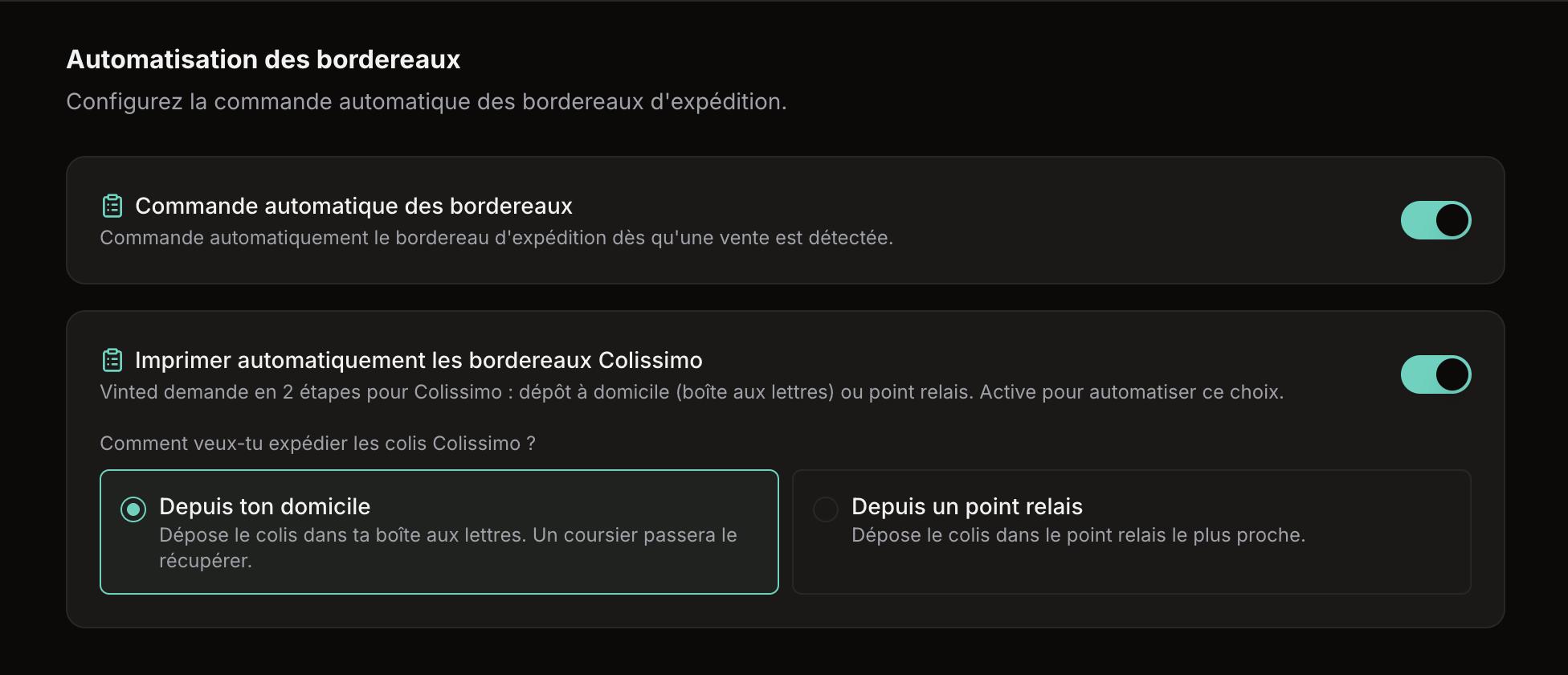
Auto shipping label for Colissimo & reliable relisting
- Colissimo — automatic management of Colissimo shipping labels: choose between drop-off in a mailbox or at a pickup point directly from the dashboard, and the assistant will order the shipping label according to your instructions.
- Stabilization of relisting.
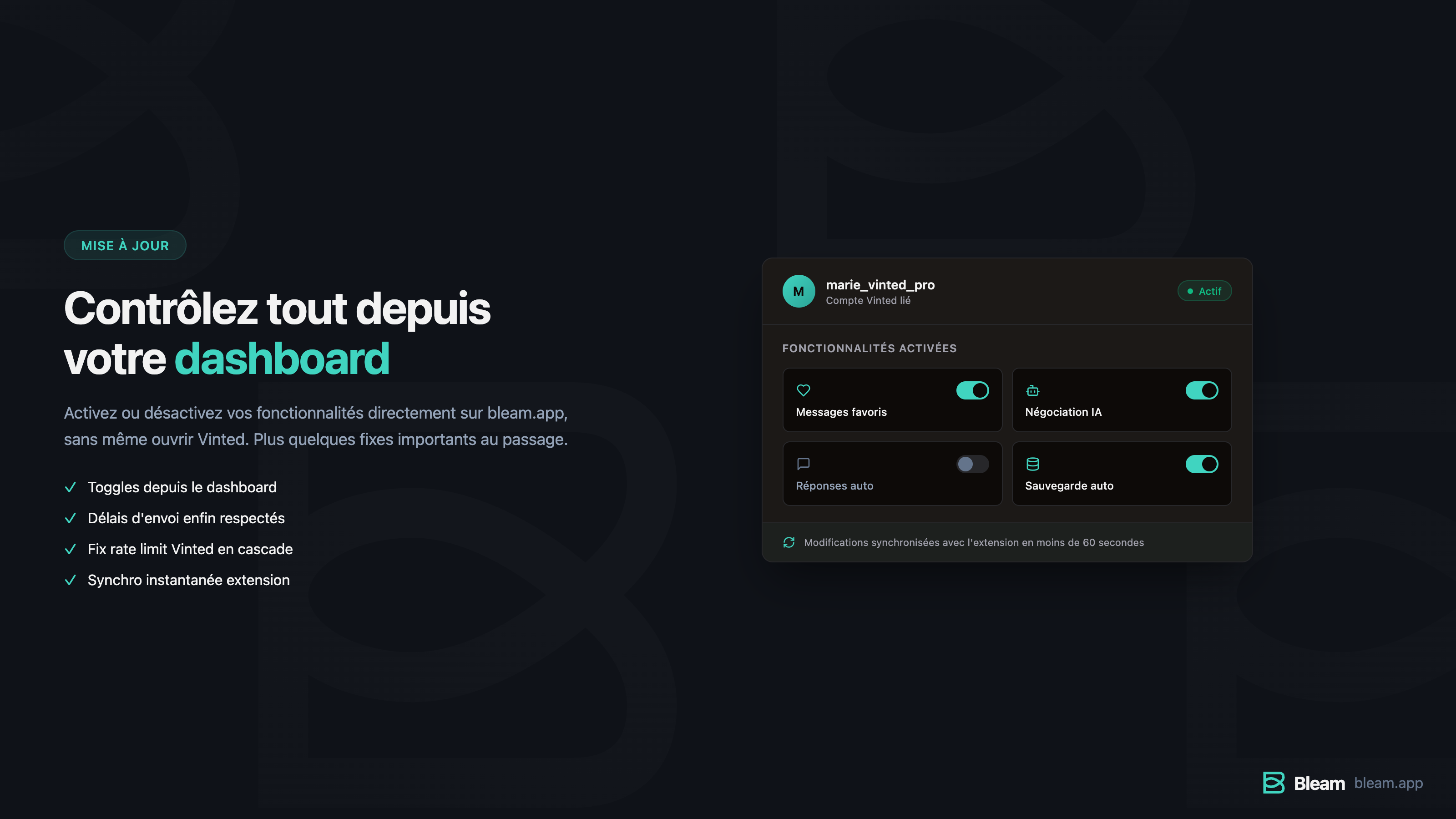
Toggles dashboard & corrections assistant
Toggles from the dashboard — enable or disable your features directly on bleam.app, in the list of your connected accounts, without opening Vinted:
- Favorite Messages — auto-DM to people who like your items
- AI Negotiation — the assistant that negotiates for you
- Auto Responses — answers to buyers' questions
- Auto Backup — backup of your listings
- Extension synchronization — changes made from the dashboard are propagated to the extension instantly
- Rate limit Vinted — in the rare cases when Vinted rate limits your offers, the assistant stops gracefully instead of sending messages without a counter-offer.
Aprile 2026
General Stabilization
- DHL — support added for A5 shipping labels
- Alert email if you exceed the limit of Vinted accounts connected to your plan (to avoid relisting issues related to this)
- Relistings — many small errors on the Vinted side have been fixed
- Books — fixed the bug that prevented relisting items in the Books category
- Billing — fixed the bug that displayed an incorrect amount for the next invoice on the billing page
- Backups — for some of you, photo modifications were stacking on the last relisting instead of starting from the original version saved on our servers. This is fixed.
Bleam Cloud and some fixes
- Transfer listing backups between Vinted accounts
- Apply the settings of one Vinted account to other selected Vinted accounts
- Full title on the backup page and more accessible interface
- Bleam Cloud update 1.1.0: service improvement
- Various fixes on the dashboard
New Update
- Favorites messages — fixed the bug that suggested an incorrect price for items under €4
- Backups — if you had relistings that did not start from your original photos, the bug is now resolved
Stabilization
- Fixed the issue that caused some Vinted accounts to disconnect yesterday afternoon. If you were affected, everything is back to normal.
- Several fixes and adjustments following the launch of Smart Assistant v2 for a more stable experience.
Automated Messages, Statistics & New Interface
- Automated messages at every sales stage — Bleam now sends a message to the buyer automatically after payment and after completion. Each message is customizable and can be activated separately.
- Automatic shipping label ordering — As soon as a sale is detected, the shipping label is ordered automatically. Just print and send.
- Statistics dashboard — A real dashboard with your personal data: revenue generated by the AI assistant, time saved, conversion and response rates, top 3 of your favorite messages, and best hours and days for sales.
- Automatic deletion of sold listings in backups, with two options: immediate deletion or deletion after 21 days to keep a history.
- Completely redesigned new interface, clearer and better organized. The site is much faster and more responsive.
Backup Management & Improved Selection
- The "Select All" button now only selects items that match the active filter. For example, you can now select only your drafts, or only your items for sale.
- Backups of sold item listings are now automatically deleted.
Shipping Labels
- management of new digital shipping labels (Vinted Go)
- management of Belgian shipping labels
- management of Vinted Sweden (https://www.vinted.se/)
Marzo 2026
Improved selection mode & smart navigation
- Added a 'Select All' button when entering selection mode (relisting, editing, or deleting listings). You can now instantly select all active items in your wardrobe.
- When relisting items, the settings are now automatically pre-filled, avoiding the need to reconfigure them with each action.
- Improved the manual intervention system of the smart assistant: when an action from you is required, clicking the 'See Conversation' button automatically opens a new tab and redirects you directly to the relevant discussion.
Access to backups from the site
- A new Backups tab is now available directly from the configuration page of each Vinted account on the dashboard https://bleam.app/fr/. You can now view, search, and manage your backed-up items without going through the extension.
- A selection mode allows you to select one or more items to delete directly from the site.
New Update
- Added an incognito mode that allows you to hide sensitive information on your dashboard (Vinted account names, etc.)
- Fixed the last issues related to listing templates.
Message Favorites Statistics
- Automatic analysis of your message performance to favorites: response rate and sales rate
- Bleam checks after 24 hours if your message has received a response or generated a sale
- Results are viewable directly from your dashboard
- Ability to configure multiple different messages for favorites
- Bleam randomly selects a message for each send to allow you to compare performance
New image editing options for relisting items
- Added a colored frame around your photos
- Photo cropping now possible
- Real-time preview system to see the impact of your changes before relisting
Complete overhaul of listing templates
- Templates are now synchronized across all your Vinted accounts
- New dynamic variables: {state} and {price}
- Ability to save a template from a draft
- Template application is now almost instantaneous (instead of ~15s per item)
- Reliability of filling out the Vinted form significantly improved
- Template search is more relevant in the title field
- The {size} variable now only displays the main size (e.g., 'XXS')
- Corrected {composition} variable
Improvements to the smart assistant & favorites preparation
- System implemented for a major improvement of messages to favorites, available very soon
- The new photo editing algorithm for relisting (currently in beta) has been significantly improved
- Several optimizations have been made to the smart assistant to enhance the relevance and reliability of its responses
The quality of your photos preserved forever
- The quality of your photos is now preserved with every relisting on Vinted, as they are often recompressed and end up becoming blurry or pixelated. We have implemented an automatic backup system that keeps your original photos on our servers before any modifications. During the first relisting, your original images are backed up and then used normally with the applied modifications. From the subsequent reposts, the system directly reuses the saved original photos to ensure maximum quality. The result is always sharp photos, with no loss of quality even after multiple relistings. This system works automatically and is available for all plans, with no configuration needed.
User Tracking Improvements
- A roadmap is now available to transparently track the features in development and upcoming: https://bleam.app/fr/roadmap
- A new 'Need Help?' bubble appears on the dashboard to quickly contact our customer support.
- A new changelog system has been implemented for clearer tracking of updates.
- Several visual and ergonomic optimizations have been made to make using Bleam smoother and more enjoyable.
Febbraio 2026
Improved Wardrobe & Task Scheduling
- Improved wardrobe: sort by price, number of favorites, brand, etc.
- Scheduling of posts and relistings (Beta).
- Bulk editing: ability to increase prices.
- New option to display nothing on shipping labels.
- Maximum time between two relistings increased.
- Category variable automatically converted to singular in templates.
- Fixes and stability improvements for the AI assistant.
Corrections to favorites messages & relistings
Nexus:
custom situations now take into account the order of offer sending.
- Fixed the multiple sending of favorites messages: only one message per user.
- Fixed relistings that could be interrupted due to a Vinted change.
Improvement of the intelligent assistant
- Choice of the order of sending counter-offers: offer before the message or message before the offer.
- Customizable delay before response from 0 to 30 seconds.
- Fixed negotiation difficulties following a Vinted update.
Major Improvement in Relisting
- Image processing is now done on our servers: faster, more reliable, quality maintained at 100% for everyone.
Corrections & Improvements
- Support for Vinted UK (vinted.co.uk).
- Improvement of the user interface of the app.
- Preservation of the Measurements and ISBN fields during automatic relisting.
- Correction of the Platform and Classification fields for video game templates.
Improvements & Internationalization
- Buyer’s Vinted username printed on the shipping label. Title displayed on 2 lines.
- Bleam site fully available in English.
- Choice of language for responses generated by the AI assistant.
- Automatic detection of Vinted two-factor verification during relistings, with Discord notification.
- Compatibility with the new Mondial Relay format for A5 shipping labels.
Bulk Modifications & Drafts
- Change the price of multiple items in a single action.
- Publish multiple drafts at once.
- Better preservation of photo quality during relisting.
- Automatic rounding of prices to the nearest euro when applying a percentage discount.